

Security Cameras Buying Guide What To Look For In
🏆 Top Picks at a Glance
 #1
#1
Best Overall
DEFEND Cellular Security Camera - 2 Pack Black
$209.99
Check Price → #2
#2
Runner Up
LaView Security Cameras 4pcs, Home Security Camera Indoor 1080P, Wi-Fi Cameras Wired for Pet, Motion Detection, Two-Way Audio, Night Vision, Phone App, Works with Alexa, iOS & Android & Web Access
$69.99
Check Price →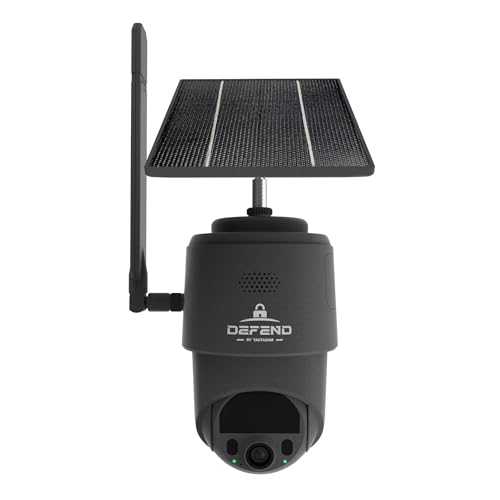 #3
#3
Best Value
DEFEND Cellular Security Camera Black
$199.99
Check Price →Our Top Picks
Affiliate disclosure: if you buy through these links, we may earn a commission at no extra cost to you.
Factors to Consider
Image quality and night vision: resolution isn’t everything
⚡ Quick Answer
Resolution matters for identifying faces and license plates — 2K (4MP) is a practical sweet spot in 2026 — but sensor quality and lens field-of-view are often more important than raw megapixels. Look for low-light sensors (sometimes marketed as "starlight" or with Sony IMX chips) and infrared plus optional color night mode so you can actually tell packages apart or read a porch number after dark. Check real night footage from the model you’re considering — specs lie and manufacturers boost daytime shots. Pro tip: mount the camera and test it at night before finalizing placement; glare from streetlights or nearby bulbs can wash out IR and ruin otherwise good hardware.
Table of Contents
Motion detection accuracy and false-alarm control
Motion is the trigger, not the product — what matters is how accurately the camera separates people and vehicles from trees, shadows, or your neighbor’s cat. Prioritize systems with human/vehicle/parcel detection and adjustable activity zones and sensitivity to reduce false alarm fatigue. Good software also lets you create schedules or use temporary disable (useful when you’re doing yard work). Pro tip: set a focused activity zone on the porch or side-door blind spot and lower sensitivity for the street to stop repeated alerts from passing cars.
Power and connectivity: battery, PoE, or wired?
Choose power based on reliability and location — battery cameras are great for renters and remote spots but require charging or solar backup, while wired or PoE cameras give continuous power and steady bandwidth for 24/7 recording. If you need professional-grade uptime (garage, side door, driveway), pick PoE or hardwired for minimal downtime and better encryption options. For Wi‑Fi cameras, prefer dual-band and avoid placing them at the edge of signal range where packet loss causes dropouts. Pro tip: if running Ethernet isn’t practical, use a dedicated Wi‑Fi access point or mesh node near the camera instead of stretching a weak household router signal.
Storage, subscriptions, and privacy trade-offs
Cloud plans are convenient for off-site access and tamper protection but add recurring costs and monthly upload bandwidth; local storage (microSD or NVR) avoids subscription fees and keeps critical footage in your control. Look for cameras that support both local and encrypted cloud backups so you can mix-and-match — keep recent clips locally and critical events in the cloud. Be realistic about retention: high-resolution continuous recording fills drives fast, so select sensible frame rates and retention policies. Pro tip: enable end-to-end encryption and two-factor authentication on cloud accounts, and keep a local backup for theft incidents when cloud access might be delayed.
App quality, integrations, and day-to-day usability
A great camera with a terrible app becomes a paperweight; look for responsive apps with clear notifications, easy clip sharing, and reliable live view. Check compatibility with your smart-home ecosystem (HomeKit, Alexa, Google Home) and whether the camera supports standards like ONVIF for NVR use — that matters if you plan to upgrade or mix brands. Pay attention to nuisance workflows: how easy is it to mute alerts, set schedules, or hand off video to a neighbor or police. Pro tip: before buying, download the app and test the demo account or reviews for responsiveness and update cadence — frequent firmware updates from the vendor mean devices stay secure and improve over time.
Frequently Asked Questions
Should I get wired (PoE) or battery cameras for my home?
Pick PoE/wired for reliability, constant power, and better bandwidth — ideal for main entries, garages, and driveways where you want 24/7 recording. Battery cameras work well for renters, temporary installs, or blind spots where wiring is impractical; add a solar panel if recharging would be a pain. If you want both flexibility and uptime, use battery cameras for secondary spots and wired for primary access points.
Do I have to pay for a cloud subscription to get useful features?
Not always — many cameras offer basic live view without a subscription, but intelligent detection, longer clip retention, and person/vehicle recognition often require a plan. Local storage (microSD or NVR) eliminates most subscription costs but sacrifices off-site redundancy and sometimes advanced cloud-only analytics. Weigh how long you want to keep footage and whether you need remote evidence storage before committing to a camera with a costly cloud lock-in.
Can I record my porch or driveway legally?
You can generally record areas visible from your property like driveways and porches, but laws vary by state and country and audio laws can be stricter than video. Avoid recording private interiors (your neighbor's garden through a window) and be cautious about two-party consent states for audio — when in doubt, disable audio or post a polite notice. This isn’t legal advice; if you’re recording a sensitive area or plan to share footage publicly, check local regulations.
How do I stop false alarms from pets, cars, or shadows?
Create activity zones and lower sensitivity for irrelevant areas (street, sidewalk) and enable pet immunity if the camera supports it; AI-based person/vehicle detection is the most effective way to reduce nuisance alerts. Also adjust mounting angle — a higher angle looking down reduces motion triggers from small animals and passing cars. If you’re still getting noise, set schedules for when motion alerts are critical versus when they can be batched into daily summaries.
What’s the difference between IR night vision and color night vision?
IR night vision uses infrared LEDs to produce black-and-white images in total darkness and is reliable at longer distances, while color night vision uses a low-light color sensor plus a spotlight to capture full-color footage at close range. IR is better for dark driveways or long-distance cover; color night vision is useful for identifying colored clothing or packaging on a porch. Choose based on the distance and detail you need after dark.
How long do battery cameras last in winter or extreme weather?
Battery life drops in cold weather — expect substantially shorter runtimes in sub-freezing temps, sometimes half the advertised life depending on frequency of motion events and live viewing. Use an external battery pack or solar panel rated for low temperatures, or choose a wired/PoE camera for exposed locations. Manufacturers usually publish cold-temperature operating ranges; match that to your climate.
What’s the best camera option for renters who can’t hardwire?
Battery-powered, clip-on, or magnetic-mount cameras are renter-friendly and offer easy installation without drilling; pick models with good mount options and theft-resistant screws if the porch is accessible. Look for cameras that support local storage and cloud syncing so you can keep evidence even if the device is moved. If you have permission for a power outlet, consider a plug-in camera that combines easy install with continuous power and better image quality.
Conclusion
Buy what matches the risk and realities of your property: wired or PoE for primary entrances and continuous recording, battery models for renters and secondary spots, and cameras with good AI and app support to cut down on false alarms. My recommendation: prioritize sensor quality, reliable app behavior, and a camera that supports local storage plus optional cloud — that combo gives you evidence, privacy, and control without an IT degree.


